
Sheru Bhai Video Prompt: 3 Copy-Paste Prompts for a 20–30s Clip
Copy-paste Sheru Bhai video prompts that produce a 20–30 second vertical clip: a character sheet, a story master prompt, and per-clip motion prompts.

Searching for a Sheru Bhai video prompt usually lands you in a comment section full of people typing "PROMPT" under a 40-second reel that never shows the text. The prompt behind those clips is not one block of copy-paste. It is three: a character lock for the image model, a story master prompt for the chat model, and a motion prompt for each 10-second clip.
This page has all three, plus the rules that keep the lion looking like the same lion from the first frame to the last. Every prompt below is built from what creators published during the November 2026 wave — a downloadable master prompt, two tutorial walkthroughs, one written prompt page, and a dated origin and timeline explainer — and each one is labeled with the job it does so you know where to paste it.
| Layer | What it locks | Where it goes |
|---|---|---|
| 1. Character lock | Face, fur, suit, chain, sunglasses | Image model, turned into a reference sheet |
| 2. Story master prompt | Beats, dialogue, clip count, word budget | Chat model |
| 3. Per-clip motion prompt | Camera, action, audio, continuity | Video model, one prompt per clip |
What a Sheru Bhai video prompt actually has to describe
Sheru Bhai is a lion character in AI-made short clips, played as an impossibly wealthy "bhai". The most familiar version is a white, upright lion in a light three-piece suit with a thick gold chain and dark sunglasses; other accounts change the fur, the clothes and the setting. The Instagram account @digitalsheru presents itself as the character's creator and originator — that is the account's own claim, not independently established authorship — and the character is not a real person or a real brand mascot (MuseSignal, updated 2026-11-15).
The format matters as much as the character. The wave picked up wider attention around November 6, 2026, rose sharply between November 10 and 12, and was still climbing on November 15, according to MuseSignal's dated timeline of Google Trends data. Two video formats dominate that wave: a luxury auction comedy where Sheru outbids animal rivals for absurd prizes, and a poor-to-rich comeback where a rival insults him and loses everything in ten seconds (Raj Photo Editing master prompt, 2026-11-13; Media.io prompt page).
So the prompt has to carry four things at once: an identity that survives across clips, a beat structure that fits 20–30 seconds, dialogue a text-to-video model can actually speak, and a vertical frame. Splitting that into layers is not fussiness — it is the only way to keep one variable still while you change another.
One caveat before you start: this guide is documentation-based. It reproduces the workflow that published tutorials describe; it does not report a timed or benchmarked test run.
Layer 1: the character lock, turned into a reference sheet
A text prompt alone drifts. Ask for "a white lion in a white suit" six times and you get six lions, six suits, six chains. The fix used in the current tutorials is to generate the character once as a reference sheet, then attach that sheet to every scene (Kapwing tutorial, 2026-11-14).
Paste this into an image model that accepts reference images:
Character reference sheet: Sheru Bhai, one photoreal anthropomorphic adult
male white lion. Dense white fur, full white mane, amber eyes. Tailored
cream three-piece suit, white dress shirt, deep-red silk tie, thick gold
curb chain, brushed-gold watch, black rectangular sunglasses. Calm,
confident expression, upright human posture, broad shoulders.

Show the same character four times on one neutral studio background:
full-body front view, three-quarter view, side view, back view, identical
lighting and identical outfit in all four. Keep the face, mane shape, suit
cut and chain length identical between views. Photorealistic, 8k detail,
real individual fur strands, no text, no logos, no watermark, no other
characters.
Then generate a second sheet for the place — the auction hall, the showroom, the palace driveway — with no characters in it. Kapwing's walkthrough calls this the environment sheet, and the reason is practical: a video model that receives one environment reference stops inventing a new room every shot.
Two habits make the sheet usable:
- Keep the sheet at 9:16-friendly framing. You are generating vertical clips later; a wide sheet forces the model to crop the character before it animates them.
- Name what must not change. "Same face, same mane, same suit cut" is a shorter, stronger instruction than a paragraph of praise.
Layer 2: the story master prompt
The second layer is a chat prompt that plans the video before any image or clip exists. The most widely shared version of this prompt was published with Raj Photo Editing's November 13 tutorial, and its structure is worth copying precisely because each rule solves a specific failure:
[VIDEO DURATION: 20 SECONDS]

You are writing a vertical short for Instagram Reels and YouTube Shorts
about Sheru Bhai, a rich white lion in a cream three-piece suit who
outbids animal rivals at absurd auctions.

PHASE 1 — Give me 10 numbered story ideas. Ideas 1-5: luxury auction wars
(rival animals, absurd prizes). Ideas 6-10: poor-to-rich comebacks (Sheru
is insulted, then transforms and wins). One title and one line each. Then
stop and ask which number I want.

PHASE 2 — After I pick a number, output only the clip prompts, each in its
own code block:
- 20 SECONDS = exactly 2 prompts of 10 seconds; 30 SECONDS = exactly 3
  prompts of 10 seconds.
- 14-18 spoken Hindi words per clip, written in Roman letters so the model
  can speak them.
- Speech starts within the first 0.5 seconds of every clip. No silent
  openings.
- Rivals speak plain, grounded Hindi. Only Sheru uses the nonsense bidding
  chain ("million, billion, trillion, quadrillion, gazillion") and the food
  and meme lines.
- The final 4 seconds show Sheru enjoying the exact prize he just won,
  rival defeated.
- Clip 2 (and 3) must open with: "Continuing seamlessly from the exact
  last frame of the previous clip."
Read the rules as answers to problems you will otherwise hit in the edit:
- Clip count from duration. A model that generates 10 seconds at a time cannot deliver 30 seconds in one shot, so the total has to be declared up front and divided.
- 14–18 words per 10 seconds. That is roughly a fast, breathless delivery. Give it 30 words and the voice will either clip the sentence or rush it into mush.
- Speech within the first half-second. Short-form viewers scroll on the first beat of silence. Asking for the line to start inside 0.5 seconds removes the dead head-frame you would otherwise cut by hand.
- Who is allowed to be absurd. The published prompt gives the nonsense numbers, street-food words and meme lines to Sheru only, and keeps the rivals in plain Hindi. That contrast is the joke; when every character shouts gibberish, the scene reads as noise.
- The last four seconds. Ending on a random gag is the classic failure. The prompt forces the payoff: crown on the head, keys in the paw, sunglasses adjusted against the new car.
- The continuity sentence. It is the cheapest consistency trick available: it tells the next generation to begin from the previous clip's final frame instead of a fresh composition.
You do not have to keep the Hindi. Swapping the dialogue language is a one-line change — but keep the word budget and the "speak immediately" rule, because both are pacing decisions rather than language decisions. You do not have to keep the relay either: if you take the single-pass route described below, change the duration header and ask for one prompt covering the whole 20–30 seconds instead of two or three 10-second blocks.
Layer 3: the per-clip motion prompt
The chat model hands you two or three blocks of text. Each of those goes to the video model on its own, with the character sheet and the environment sheet attached. Use this skeleton so no clip forgets a variable:
Continuity: continuing seamlessly from the exact last frame of the
  previous clip.
Subject: [the character-lock sentence from Layer 1]
Location: [environment from the environment sheet]
Prize: [the object being bid on]
Action: [who moves, who reacts, who wins this beat]
Camera: [one camera move — slow push-in, whip pan, crash zoom, low angle]
Dialogue: [14-18 words, romanized, speaker-labelled]
Audio: [room tone, gavel, light comic score]
Style: photorealistic 8k live-action cinema, 9:16 vertical, shallow depth
  of field
Avoid: duplicate characters, costume or mane changes, extra limbs,
  on-screen text, logos
Filled in for an auction opening:
Continuity: continuing seamlessly from the exact last frame of the
  previous clip.
Subject: Sheru Bhai, the same photoreal white lion in the cream three-piece
  suit, red tie, gold curb chain and black rectangular sunglasses.
Location: a marble auction hall at night, warm chandeliers, red velvet
  bidders' row.
Prize: a pearl-white concept car on a rotating platform.
Action: the rival - a heavy grey elephant in a navy suit - slaps his
  paddle down and smirks. Sheru does not look at him; he adjusts one cuff,
  then raises his paddle without breaking eye contact with the platform.
Camera: slow push-in on the paddle, then whip pan to Sheru's face.
Dialogue: Elephant, plain Hindi: "Yeh gaadi meri, teri aukaat kya hai?"
  Sheru, calm: "Million, billion, trillion, quadrillion - ghop ghop
  dollar."
Audio: low room murmur, one gavel knock, restrained comic strings.
Style: photorealistic 8k live-action cinema, 9:16 vertical, shallow depth
  of field.
Avoid: duplicate characters, costume or mane changes, extra limbs,
  on-screen text, logos.
The same skeleton carries a comeback beat, where the clip's whole job is the transformation. Keep the face and mane sentence identical, put the change in the Action line ("torn grey shirt, then the cream suit on the turn"), and put the cut in the Camera line so the model knows where the change happens.
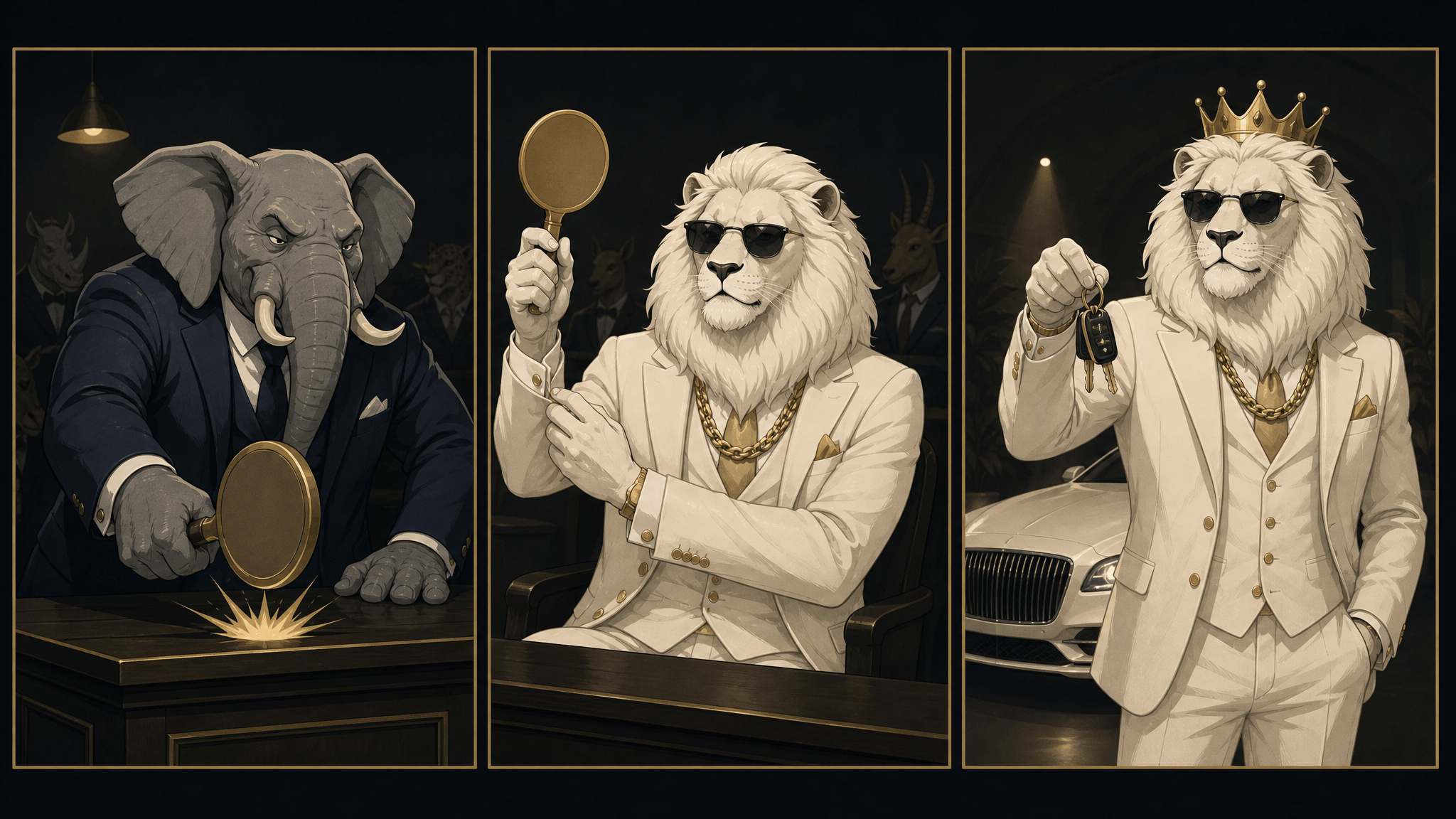
The three beats a 20–30 second clip has to land: the rival bids, Sheru counters, the prize is collected.
Which model you send these to decides how much of the prompt survives. Seedance 2.5 is the model named in the current English-language tutorials: Kapwing's walkthrough selects it in Kai and combines six clips in the editor afterwards, and a separate tutorial from Zero to AI covers the same pairing with ChatGPT (Zero to AI, 2026-11-11). Per AI Fruit's Seedance 2.5 model page, the model accepts text or image input, returns 4–30 seconds per clip with synchronized audio, and supports first/last-frame control.
That per-clip limit is why the relays exist, but it also means the relay is a choice rather than a requirement. If you want two or three distinct beats with a hard cut and the joke landing on a specific frame, generate the 10-second clips and chain them; the continuity line and the editor's frame match are what keep them from drifting. If you would rather trade beat control for fewer seams, generate the whole 20–30 seconds in one pass and treat the dialogue as a single take — you will have less say over where the payoff lands, but nothing to stitch.
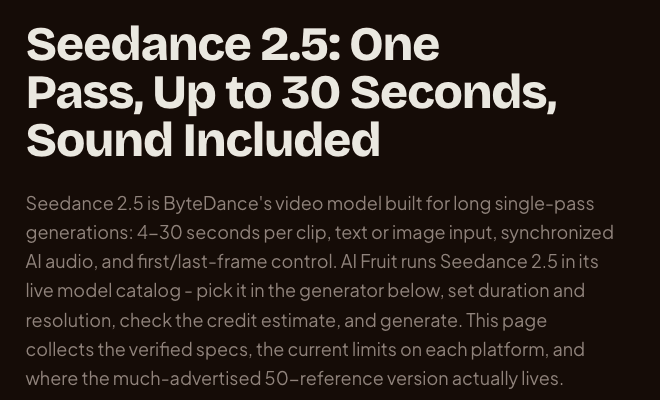
AI Fruit's Seedance 2.5 page, screenshot 2026-11-16: the duration and aspect-ratio limits these prompts are planned around.
What breaks, and the line in the prompt that fixes it
| Symptom | Usually caused by | Fix |
|---|---|---|
| The lion looks like a different lion in clip 2 | Text-only character description, no sheet attached | Attach the character sheet to every generation; repeat the identity sentence |
| A new room appears every shot | No environment reference | Generate an environment sheet and attach it |
| Six fingers, two tails, a floating paddle | Crowded action in one shot | One action per clip; add limbs and paws to the avoid list |
| The first second is silent | Model waits for a beat before speaking | "Speech starts within the first 0.5 seconds" |
| Dialogue is clipped or gabbled | Too many words for the duration | Cut to 14–18 words per 10 seconds |
| The clip ends on a random gag | No payoff instruction | "Final 4 seconds: he enjoys the exact prize" |
| Captions and logos appear from nowhere | Model invents on-screen text | Add "no on-screen text, no logos, no watermark" |
Two more that are not in the prompt but in the settings: a 16:9 generation cropped to vertical loses the head or the prize, and a duration longer than the model supports gets silently truncated. Set the aspect ratio to 9:16 and the duration to the clip length you actually planned.
The editing pass nobody films
Assembling the clips is where timing gets fixed, which is why Kapwing's walkthrough ends in the editor: pronunciation, volume and pauses are faster to correct after generation than to re-prompt for. Check three things — each clip's last frame matches the next clip's first, the bidding line is audible over the score, and the prize named in the dialogue is the prize on screen.
The fruit re-skin: same stack, different character
Nothing in the three layers is specific to a lion. The stack is a character lock plus a beat structure plus a motion prompt, and the character is the one variable you can swap without rewriting the method. Swap the species and keep the grammar: a mango kingpin in a cream suit, a watermelon rival, a durian auctioneer, the same gavel and the same last-four-seconds payoff.
The character sheet changes to something like:
Character reference sheet: one photoreal anthropomorphic mango
character, "Aam Bhai": glossy ripe mango body with a leaf stem, expressive
eyes, tailored cream three-piece suit, white shirt, deep-red tie, thick
gold curb chain, brushed-gold watch, black sunglasses. Confident posture,
upright human stance.

Four views on one neutral background: front, three-quarter, side, back,
identical outfit and lighting in all four. Photorealistic, 8k detail, no
text, no logos, no watermark.
Then run the same Layer 2 master prompt with the rival list changed to fruit characters, and the same Layer 3 skeleton with the location swapped to a fruit market or a chrome showroom. Everything you learned about word budget, silence and continuity still applies.
In AI Fruit, that is one page: paste the motion prompt into the video generator, attach the character sheet as the reference image, pick the model, set 9:16, confirm the duration and the credit estimate before generating. Rather than trust a list copied into an article, open the selector itself: as of 2026-11-16 the generator opens on Grok Imagine Video and the model catalog includes Veo, Kling, Wan, Seedance 2.0 and Seedance 2.5, which is enough choice to test which one holds your character best instead of committing to one vendor. If you want more prompt patterns for fruit-specific scenes, the Seed 2.1 Pro prompt collection covers a different model and a different set of scenes. And if you would rather skip the three-layer assembly, the AI Sheru video page has five fruit-lion clips generated for that page, each printing the exact prompt it used — press "Use these settings" to load one into the editor, and the credit cost (18 for the default 6-second 720p run) shows on the generate button before you spend anything.
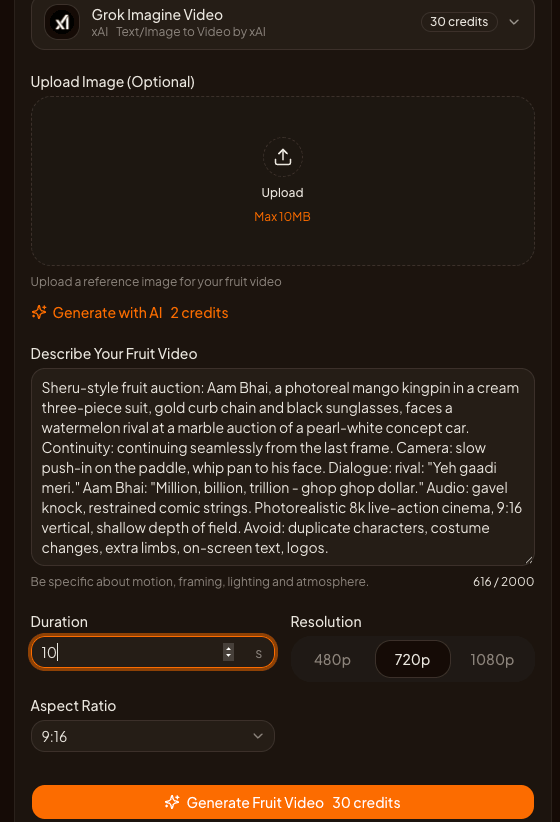
The Layer 3 prompt pasted into AI Fruit's generator: 10-second clip, 9:16, credit estimate visible before generating (screenshot, 2026-11-16).
Rights, credits and what this article cannot tell you
Three limits are worth stating plainly before you post:
- The character is fan-made. @digitalsheru presents itself as Sheru's originator. Using a character someone else originated in monetized content is a rights question this article does not answer; if that risk matters to your channel, build your own character with the same recipe.
- The trend numbers move daily. The dates above, and the trend curve they come from, are what the cited sources published on 2026-11-14 and 2026-11-15. Re-check before you plan a series around them.
- No quality or reach guarantee. These prompts come from documented workflows, not from a measured test. Generation time, audio quality, lip movement and how well a model holds a face vary by model, settings and queue.
The stack, in one paragraph
Lock the character with a reference sheet, plan the video with a master prompt that declares the duration and divides it into clips, then send each clip its own motion prompt with the sheets attached, the dialogue written in the language you want spoken, and a continuity line that starts from the previous frame. Fix timing in the editor. If you would rather start from a fruit character than a lion, the AI Fruit generator runs the same sheet-plus-motion-prompt workflow with the model, duration and credit cost visible before you spend anything.