
FastH3 Omni, Explained: MiniMax H3 Distilled to 8 Steps — Performance, Usage, and Deployment
What FastH3 Omni is, how its 8-step distillation works, official latency benchmarks and the conditions behind them, and a runtime-by-runtime ComfyUI / FastVideo / UniServe deployment guide — plus the license caveats most coverage skips.

FastH3 Omni is FastVideo's open-source distillation of MiniMax H3, released October 20, 2026. Give it a prompt plus a few images, video clips, or audio references, and it generates a finished clip with synchronized stereo sound in eight transformer evaluations instead of the base model's fifty — with official benchmarks showing 5.6–11.9× lower end-to-end latency on datacenter GPUs, and quantized checkpoints that run on a single RTX 5090 or a DGX Spark.
This guide collects what the model can do, how the distillation works, what the benchmark numbers actually measure, and what it takes to run it across its three supported runtimes. Everything here comes from the official release documentation and model cards; we have not run the model ourselves, and where a number depends on FastVideo's own test conditions, we say so.
What FastH3 Omni is
MiniMax released H3 in early August 2026 as an open-weight, omni-modal generation system: text, images, video, and audio go in as one shared context, and video with native 32-kHz stereo audio comes out. Its Ref2VA mode accepts up to nine images, three video clips, and three audio clips — twelve references total — and FastH3 Omni inherits that entire input contract unchanged.
FastH3 Omni is not a new base model. It keeps H3's text encoder (built from Qwen3-VL-32B), its video VAE, and its audio VAE, and replaces only the diffusion transformer with a distilled "student" that needs far fewer denoising steps. In the FastH3 lineage, earlier releases had already distilled base H3's 50-step video trajectory down to eight steps; Omni adds the full reference-conditioning path on top of that eight-step budget. The release was co-developed with Nuva Lab, which curated the omni-reference training dataset, with compute support from Reactor.
What you get out is specific: video with synchronized 32-kHz stereo audio at 24 FPS, in clip lengths of 5, 10, or 15 seconds (124, 243, or 362 frames). At least one image or video reference is required — this is a reference-to-video model, not pure text-to-video.
How eight steps replace fifty
The release combines two distillation techniques, and the interplay is the interesting part.
PDD — many updates per forward pass. Parallel Decoding Distillation widens the student's output heads from a single velocity prediction to a 32-interval fine time grid. At inference those heads run as eight fused blocks of four, so one transformer evaluation advances the trajectory by four intervals. Eight evaluations cover the whole path that took base H3 fifty. A teacher-supervised loss keeps every head's update consistent with the frozen base model.
DMD — matching the finished result. On top of PDD, Distribution Matching Distillation trains a critic to model the distribution of the student's samples while the frozen H3 teacher defines the target; the student closes the gap on completed video and audio rather than on individual denoising steps. Critic and student updates alternate during training.
Two supporting choices matter for deployment. The student trains and samples with Video Sparse Attention on 128-row tiles, so the sparsity that serving exploits is the sparsity it learned. And references are never noised — images, clips, and audio condition the student, teacher, and critic in every forward pass, which is what keeps multi-reference identity stable through generation.
The training bill: 64 NVIDIA B300 GPUs, 3,500 steps, roughly 7,800 GPU-hours. The training code ships in FastVideo, so the recipe is reproducible if you have your own dataset and the hardware.
How fast it actually is — and what the numbers measure
FastVideo benchmarked FastH3 Omni against base H3 across 27 matched workloads: nine reference mixes (from one image up to nine images plus three clips) crossed with 5-, 10-, and 15-second requests, all on eight GB200 GPUs. Timings cover the full pipeline — reference encoding, generation, decoding, and the finished MP4 — at a 1344×768 canvas, reported as three-seed means.
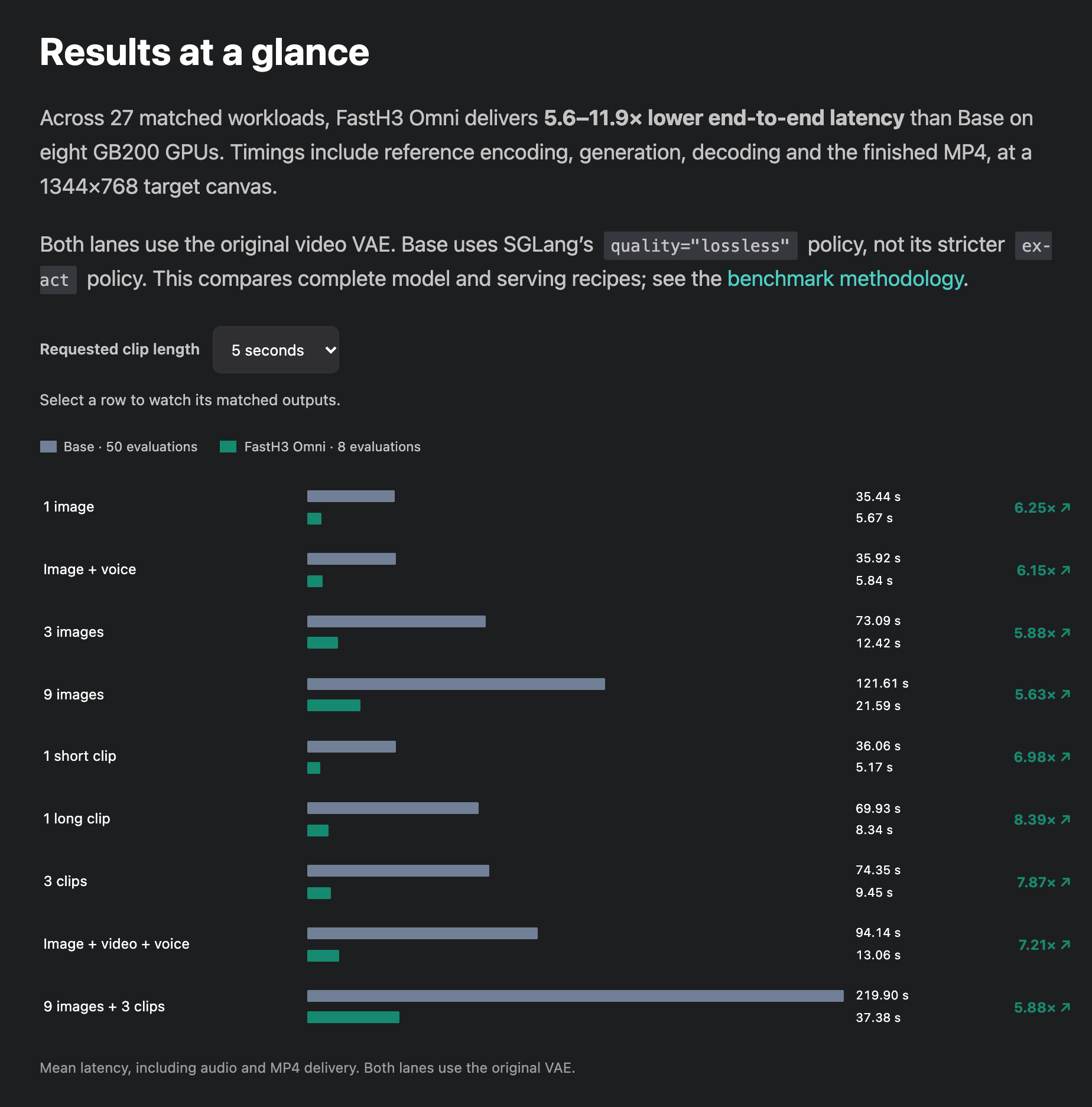
Source: FastVideo release blog (haoailab.com), October 20, 2026 — 27 matched workloads on 8× GB200, three-seed means.
The headline: 5.6–11.9× lower end-to-end latency across all 27 workloads. A few representative rows:
| Workload | Base H3 (50 steps) | FastH3 Omni (8 steps) | Speedup |
|---|---|---|---|
| 1 image, 5 s | 35.44 s | 5.67 s | 6.25× |
| 1 image, 15 s | 139.69 s | 14.14 s | 9.88× |
| 1 short clip, 15 s | 140.29 s | 11.76 s | 11.93× |
| 9 images + 3 clips, 15 s | 422.20 s | 59.77 s | 7.06× |
Read the conditions as carefully as the ratios. These are full serving recipes on eight GB200 GPUs, with base H3 running its lossless numerical policy. The team states that its UniServe stack reaches real-time generation for 768p clips of 5, 10, and 15 seconds on particular FastH3 Omni tasks — a conditional claim, not a blanket one. And the published side-by-side clips are explicitly matched qualitative comparisons, not evidence that the distilled model's output quality equals the base model's. Independent quality verdicts don't exist yet; treat early community impressions as impressions.
Running it: three runtimes, one decision
FastH3 Omni ships in runtime-specific checkpoint formats, and picking the right one matters more than picking the "best" one.
ComfyUI — visual workflows on consumer hardware
The ComfyUI route needs four components in your models/ folders:
- Diffusion model:
fasth3_omniref_8step_pruned_bf16.safetensors(44.2 GB) or the INT8 ConvRot build (22.2 GB, the official template's default) - Text encoder: Qwen3-VL-32B based, in BF16 (51.5 GB), INT8 (27.1 GB), or NVFP4 AWQ (15.7 GB — Blackwell only)
- Video VAE: BF16 (5.2 GB) or INT8 (2.8 GB)
- Audio VAE: fp32 (0.6 GB) — required, or you get no soundtrack
The official workflow template (video_fasth3_ominiref_r2v, added October 20) runs 8 steps at guidance 1.0 with a video shift of 12.0 and audio shift of 3.0, defaulting to 1344×768 and 124 frames. Prompts address references by position — <Picture 1>, <Video 1>, <Audio 1> — and the template exposes a reference sizing choice: match scales references down to the generation's pixel area, while max keeps a 2048-pixel short edge for identity fidelity at several times the compute cost. Note that ComfyUI uses its own sampler and kernels, so outputs can differ from FastVideo and UniServe runs. For multi-shot H3 projects in ComfyUI, the Director plugin ecosystem adds timeline-style storyboarding on top — we cover that separately in MiniMax H3 Timeline in ComfyUI.
FastVideo local — DGX Spark and RTX 5090
For single-workstation use, FastVideo runs the NVFP4 QAD variant — weights trained through quantization-aware distillation for NVFP4 execution on Blackwell hardware. Both device profiles default to 480p output. The DGX Spark (GB10, 128 GB unified memory) keeps model components resident; the RTX 5090 (32 GB) offloads the text encoder and needs a precomputed AdaLN table. Optional NVFP4 VAE decoders come in a 36-layer quality tier and an 8-layer fast tier.
UniServe — production serving
For serving, the BF16 checkpoint runs on UniServe with its reference-conditioned (ref2va) configurations on GB200/B200, RTX PRO 6000 Blackwell, and Hopper GPUs including H100/H200. The documented example deploys a two-node, 4+4 GPU replica that serves 768p requests up to 15 seconds with two requests resident, exposed over a simple REST endpoint (/v1/videos/sync). UniServe's guide covers installation, GPU placement, and request capacities.
RTX 4090-class GPUs
Hardware without FP4 support isn't locked out: FP8 weights are a separate variant with an RTX 4090 recipe using layerwise offload, paired with BF16 text-encoder components. Expect outputs to differ numerically from the BF16 and NVFP4 builds.
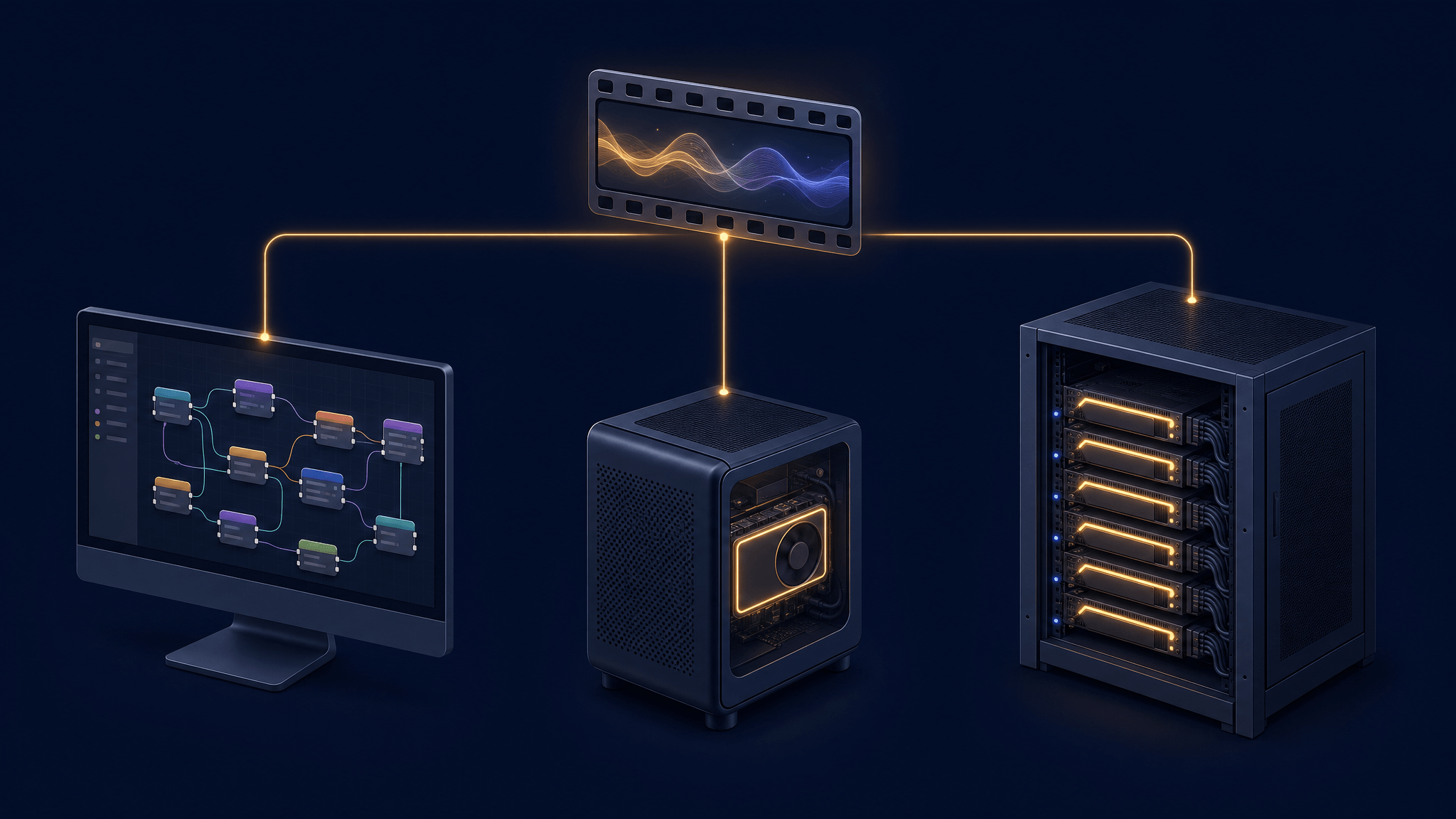
The decision in one line: ComfyUI for experimentation and visual control, FastVideo local for a personal 480p workstation, UniServe for multi-user 768p serving — and FP8/INT8 when your GPU predates FP4.
The license fine print most coverage skips
FastH3 Omni's weights are governed by the MiniMax H3 Community License Agreement, and three of its terms will surprise people:
- Territory. The license's applicable territory excludes the European Union, the United Kingdom, South Korea, and the United States. Use or distribution there requires a separate license from MiniMax.
- Scale. Commercial products or services built on the model that exceed $20 million in yearly revenue need prior written authorization. Smaller commercial use is permitted — but the license asks you to prominently display "MiniMax H3" in your product's UI.
- Outputs and derivatives. Generated videos are yours in the sense that they are not treated as model derivatives — but you may not use outputs to train or improve other AI models.
None of this is legal advice; read the agreement for your situation. But if you're evaluating FastH3 Omni for a product, the territory clause alone is a checklist item most launch coverage never mentions.
Running H3 without owning the hardware
The honest bottom line on deployment: self-hosting FastH3 Omni means committing to large downloads (the BF16 diffusion model alone is 44 GB, before a 27–51 GB text encoder) and, for real-time 768p serving, datacenter GPUs. It's a compelling package if you have the hardware and need local control.
If what you actually want is H3-quality video from references — and not the ballast of running it yourself — the base model it distills is already runnable online: AI Fruit hosts MiniMax H3 in its generator, with text- and image-to-video at 4–15 seconds and 768P/2K output, no GPUs of your own required. The distilled Omni release doesn't change what that path costs you; it mainly changes what self-hosters can do.
Where this leaves you
FastH3 Omni matters for three groups. ComfyUI users get reference-to-video-with-audio in a native workflow at consumer-viable sizes. Self-hosters get an eight-step model whose benchmark sheet justifies the distillation on latency alone. And serving builders get a documented production path with published per-workload timings. Before committing, verify the checkpoint sizes against your storage, the license terms against your territory, and — when independent quality comparisons start appearing — whether the distilled output holds up for your kind of content.