
Manus Video Editor: How to Turn AI-Generated Footage Into a Publishable Short
The Manus video editor workflow explained: generate source material, import and auto-transcribe footage, polish a per-track timeline (subtitles, music, SFX), then cut long video into a publishable short. Documentation-based walkthrough of the Manus 2.0 release.

You generated a great AI clip. One shot looks genuinely good — and then you realize it isn't a video yet. There's no hook in the first two seconds, the music drowns out the voiceover, the subtitle wording is off, and the whole thing runs thirty seconds too long. That gap between "a good shot" and "a video I'd publish" is exactly what the Manus video editor was built to close.
Released with Manus 2.0 on October 1, 2026, the editor lives inside Manus Studio, Manus's desktop app for macOS and Windows (official announcement). The workflow it formalizes is bigger than one tool: generate your material with AI, get it onto a real multi-track timeline, let the agent build a first cut, then finish the video per track — subtitles, music, sound effects, pacing — by hand or by instruction. Manus's own author documented the full pipeline on a travel project: 125 clips and nearly two hours of raw footage in, a 10:50 cut with 195 edits out.
This article walks that workflow step by step. It's based on Manus's official announcement and the project numbers documented there — not on our own lab testing — so treat the specifics as reported behavior, with the source linked at each claim.
Why a good shot still isn't a video
Video models have gotten remarkably good: write a sentence, and minutes later you have a beautiful shot. But publishing requires hundreds of small decisions that no single shot answers. In the Manus announcement, the author lists what actually stands between generation and publication: what the video is saying, how to stop the scroll in two seconds, where the joke lands, which music fits, whether the music drops when someone speaks, what font the subtitles use, where every cut falls.
The traditional answers to that problem fail AI creators in two specific ways:
- A flattened export can't be fixed. If your AI tool hands you one finished MP4, "the music is a bit loud" means regenerating the whole video — and the parts you liked may change too.
- Chat-only edits are imprecise. "Move that clip half a second earlier" is hard to express in words, and fixing one thing in a conversation can shift another.
Manus's answer has two halves: the agent makes the whole video first, and the video editor hands final cut back to you. Every element the agent used — generated shots, images, subtitles, motion graphics, voiceover, music, sound effects — sits on its own separate track on the timeline. You get an editable project, not a flattened file.
The workflow at a glance
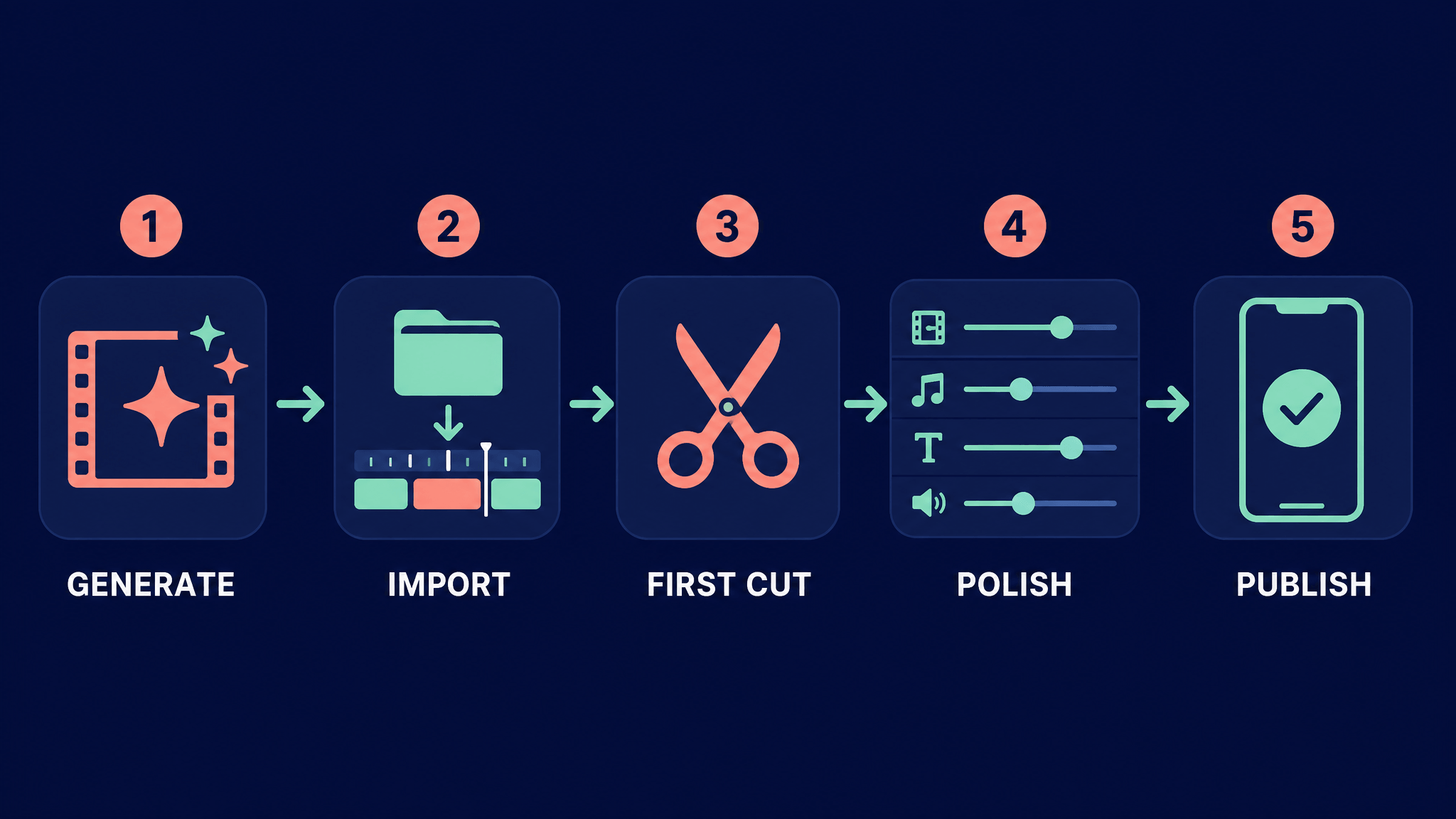
Here's the full finishing pipeline the announcement documents, and who does what at each step:
| Step | What happens | Who drives |
|---|---|---|
| 1. Generate source material | Agent searches references, writes a script, generates shots, music, voiceover, SFX, and code-rendered graphics | Agent |
| 2. Get it on the timeline | Agent's elements land as separate tracks; your local footage can be imported and auto-transcribed | Agent + you |
| 3. First cut | Agent arranges highlights into a structured rough cut (documented: 80–90% there on version one) | Agent |
| 4. Per-track polish | You drag, trim, retype subtitles, set volume — or instruct the agent; both hit the same project | You (+ agent) |
| 5. Cut to length | Trim repetitive sections until the runtime earns its watch (documented: 12:48 → 10:50) | You + agent |
Step 1: Start with material worth editing
The editor only polishes what generation produces, so the workflow actually starts before the timeline. Manus's generation side is unusually complete: it can search the web for references, write the script, generate shots through video models (Seedance 2.5 is named in the announcement), produce images, music, voiceover, and sound effects, and even write code for the visual elements that models can't generate — dynamic typography, charts, map routes, rhythm-game interfaces.
Two documented examples show the range:
- A 102-second Fat Bear Week explainer where the agent picked the topic from current news, remade classic memes with bear photos, and annotated every on-screen fact with its source — flagging one unconfirmed vote count before publishing.
- BEAT RUSH, a 20-second piece mixing Seedance-generated dancing anime characters with a code-built game interface and beat effects in the same video.
Whatever generator you use, this step sets your ceiling: material generated with context — knowing the platform, the format, the message — arrives at the editing stage needing less rescue. This is also where it's worth being clear about what your tools each do. AI Fruit, for example, is built for exactly this generation stage: it generates AI fruit videos from prompts, images, templates, tools, or a selectable model, and shows model choices and expected credit costs before you generate, where available, rather than after. It is deliberately not a timeline editor — the finishing stage is a separate job for a separate tool, which is precisely the division of labor the Manus workflow formalizes. If you're starting from zero, AI Fruit's AI video generator gets you material worth editing; the editor then makes it publishable.
Step 2: Get your footage onto the timeline
The video editor runs on the desktop, which unlocks the part most AI tools skip: your own footage. Because Manus Studio is a desktop app (macOS and Windows), you can drag video files into the chat or just tell Manus which folder they live in — it imports the clips onto the timeline for you.
Import isn't a dump, either. In the documented travel project, Manus took 125 camera clips totaling almost two hours from an external drive, then transcribed every clip and sampled frames, organizing what happened across the three days of footage into material it could structure. If you've ever faced a folder of unmarked footage, that's the tedious hour the agent absorbs.
Note where the editor lives: on the web app, choosing to edit in the video editor walks you through downloading Manus Studio. The timeline is a desktop-first workflow, not a browser tab.
Step 3: Let the agent build the first cut
With material on the timeline, Manus arranges it into a structured rough cut. In the travel project, it picked out the highlights, sequenced them in itinerary order, and produced a 12:48 first cut — longer than intended, but structured: every clip had a listed duration and transcript line.
The announcement's author frames the division of labor with a number worth quoting carefully as the author's own experience: Manus typically gets "80% to 90%" of a video right on the first version. The last 10–20% — a slightly quieter music bed, one rewritten subtitle, a half-second trim, swapping a generated shot for your real product photo — is the part creators care about most. That's a claim from the team building the tool, not an independent benchmark, but it matches the shape of the workflow: the agent drafts, you decide.
Step 4: Finish per track, not in chat
This is the step that makes the first 90% salvageable. Every element type keeps its own track, so each fix touches only its own layer:
- Video clips and images — drag to reorder, trim a clip shorter, replace a generated shot with your own photo.
- Subtitles and text effects — retype wording directly; in the travel project the final timeline carried 325 subtitles plus 112 text effects and stickers, each independently editable.
- Music — the documented project split music into seven segments by mood, with volume automatically lowered whenever someone was speaking.
- Sound effects and voiceover — 118 sound effects sat on their own track in the same project.
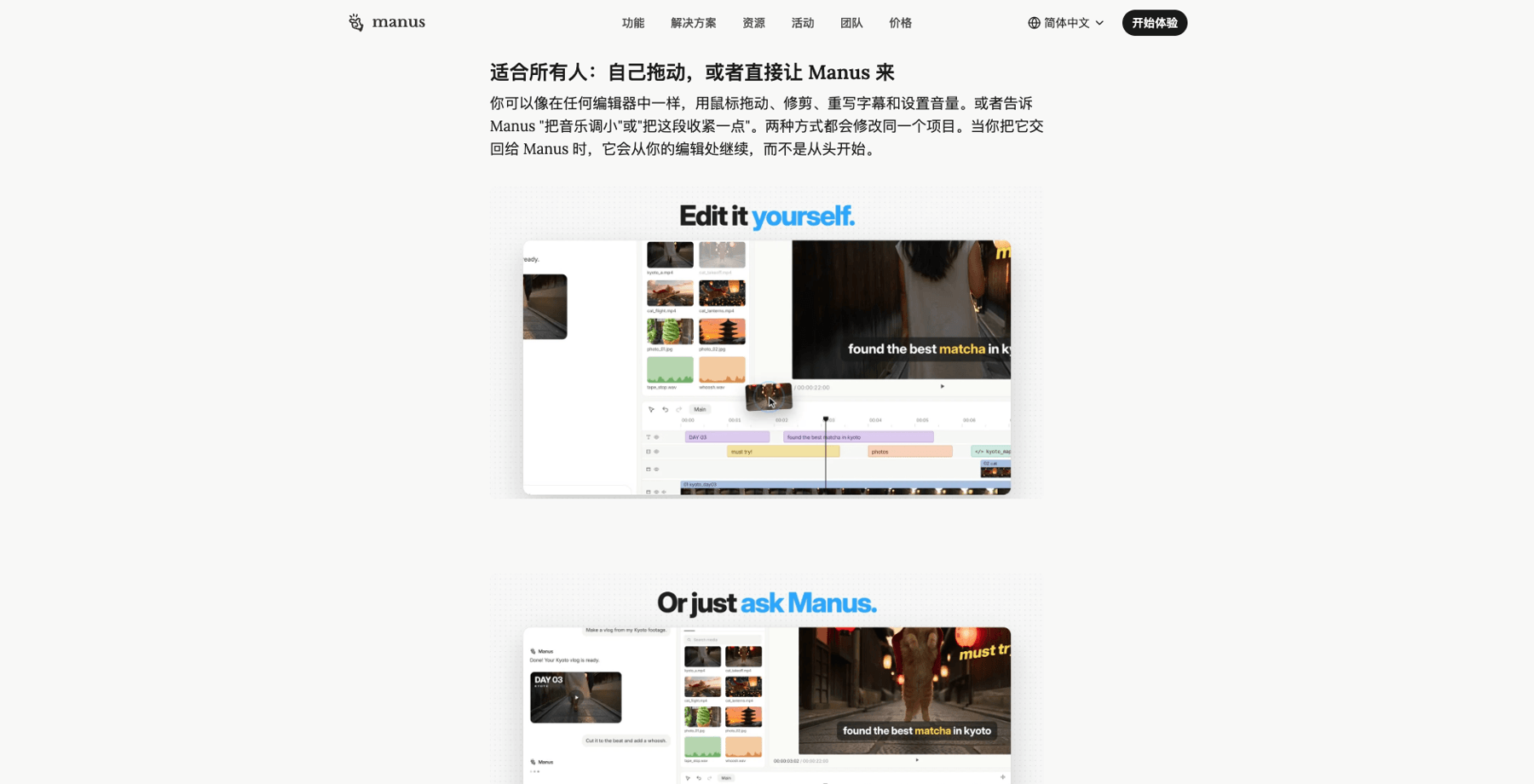
Source: Manus official blog, "Introducing the Manus 2.0 video editor" (manus.im, October 1, 2026)
You can do all of this with a mouse, like any editor — or you can say "turn the music down" or "tighten this section" and let Manus do it. The important mechanic: both routes modify the same project, and when you hand the video back to the agent, it continues from your edits instead of starting over. No editing experience is required, per the announcement; you only need to know the feeling you want.
Step 5: Cut it down to publishable length
The first cut is a draft, not a duration. In the travel project, 12:48 was longer than the target, so Manus listed every segment's length and transcript, identified twenty-plus repetitive or dragging sections, and cut them — landing at 10:50 with 195 total edits. Shortening didn't mean shaving blindly; it meant finding the sections that repeated a beat the video had already hit.
The same long-to-short move transfers directly to marketing workflows. The announcement calls it out explicitly: a meeting recording or an interview can become multiple short clips sized for social platforms. One long source in, several publishable shorts out — with the transcript and per-clip durations making the selection auditable rather than vibes-based.
What the Manus video editor workflow changes for AI creators
The Manus video editor is one tool's take, four days old at writing, but the workflow it demonstrates is the durable part: AI generation now reliably gets you a strong draft, and finishing is a distinct stage with its own tooling — per-track control, transcript-based organization, and a cut-length pass that turns "almost postable" into "posted." Tools will compete at both stages; the division between them (generate context-rich material → finish on a timeline where the final cut is yours) is likely to hold even as the specific products iterate.
If the generation stage is where you're still shopping, AI Fruit's AI video generator shows you model options and expected credit costs before you spend, where available — so the material that reaches your editor is worth editing in the first place.