Google Vids 2.0 vs AI Fruit: Which Makes Better TikTok Videos?
We compared Google Vids 2.0 and AI Fruit for TikTok video creation. See features, pricing, output quality, and which tool fits your workflow.
 AI Fruit Team
Last updated: April 2026
Google Vids 2.0 just hit #1 on Product Hunt with 339 upvotes, promising free AI video creation for everyone. Meanwhile, TikTok's fruit video trend — watermelons eating grapes, baby strawberries with googly eyes — keeps racking up millions of views with no signs of slowing down.
So the question is obvious: can Google's shiny new tool actually make the kind of AI fruit videos that blow up on TikTok?
We tested both Google Vids 2.0 and AI Fruit over the past two weeks, generating 40+ videos across fruit eating fruit, baby fruit, and fruit drama styles. Here's what we found.
Google Vids 2.0 vs AI Fruit at a Glance
Google Vids 2.0 is a general-purpose AI video tool built for business presentations and team collaboration inside Google Workspace. AI Fruit is a specialized generator built exclusively for TikTok-style fruit videos with 50+ niche templates. They solve fundamentally different problems.
| Feature | Google Vids 2.0 | AI Fruit |
|---|---|---|
| Primary Use Case | Business presentations, training, marketing explainers | TikTok fruit videos (eating, baby, drama, feeding) |
| AI Models | Gemini (storyboard) + Veo 3.1 (video) + Lyria 3 (music) | Wan 2.5/2.6, Seedance, Hailuo (user's choice) |
| Fruit-Specific Templates | 0 | 50+ |
| Output Format | 16:9, 9:16, 1:1 (added Oct 2025) | 9:16 vertical (TikTok-optimized) |
| Pricing | Free (10 clips/month), or with Workspace ($7+/user/month) | Free trial, then Basic/Pro subscription |
| Collaboration | Real-time team editing | Single-user focused |
| Generation Speed | 1-3 minutes | 30-60 seconds |
| Video Length | Up to 30 min (8-sec AI clips) | Up to 10 seconds per clip |
| Platform | Web (Google Workspace) | Web |
Data based on our testing in April 2026.
What Is Google Vids 2.0?
Google Vids 2.0 is Google's AI-powered video creation tool integrated into Google Workspace. It combines three AI models — Gemini for storyboarding, Veo 3.1 for text-to-video generation (8-second clips with synchronized audio), and Lyria 3 for AI music — to help users create professional videos from text prompts, documents, or slide decks — think training videos, product demos, and internal announcements.
Key features:
- Gemini-powered storyboarding — describe what you want, and Gemini generates a complete multi-scene storyboard
- Veo 3.1 video generation — create 8-second AI video clips from text prompts
- AI avatars — realistic human, animated 2D, and 3D avatars with automatic lip-syncing
- Lyria 3 music generation — AI-composed soundtracks (Google AI Pro/Ultra subscribers)
- Google Workspace integration — pulls content from Docs, Slides, and Drive; direct YouTube publishing
- Real-time collaboration — multiple team members can edit simultaneously, just like Google Docs
- Multiple aspect ratios — 16:9 landscape, 9:16 vertical, and 1:1 square
Best for: Teams creating business content — training videos, product launches, internal comms, marketing explainers. According to Google's announcement, Vids 2.0 is designed to "make video as easy as making a slide deck."
Not ideal for: Niche creative trends like fruit videos, rapid-fire content creation for specific TikTok sub-genres. While Google Vids now supports 9:16 vertical output, it lacks niche-specific templates and its AI models aren't optimized for specialized content types.
What Is AI Fruit?
AI Fruit is a vertical SaaS tool built specifically for generating AI fruit videos — the TikTok trend where fruits eat other fruits, baby fruits have cute expressions, and fruit characters act out dramatic storylines. Every template, prompt preset, and model setting is optimized for this one niche.
Key features:
- 50+ fruit-specific templates — covering fruit eating fruit (ASMR), baby fruit, fruit drama, and feeding food
- Multiple AI models — choose between Wan 2.5/2.6 (most realistic), Seedance (fastest), or Hailuo (best for complex interactions)
- One-click generation — pick template, select fruits, hit generate
- TikTok-ready output — direct 9:16 vertical format, no cropping needed
- Niche optimization — every model parameter is tuned for fruit textures, interactions, and physics
Best for: TikTok creators, social media managers, and content creators focused on the AI fruit video trend. In our testing, AI Fruit produced the most consistent fruit-specific results because the entire product is built around this single use case.
Not ideal for: General video creation, business presentations, team collaboration, or any content that isn't fruit-related.
Feature-by-Feature Comparison
We tested both tools across six categories that matter most for TikTok video creation. Here's how they compare.
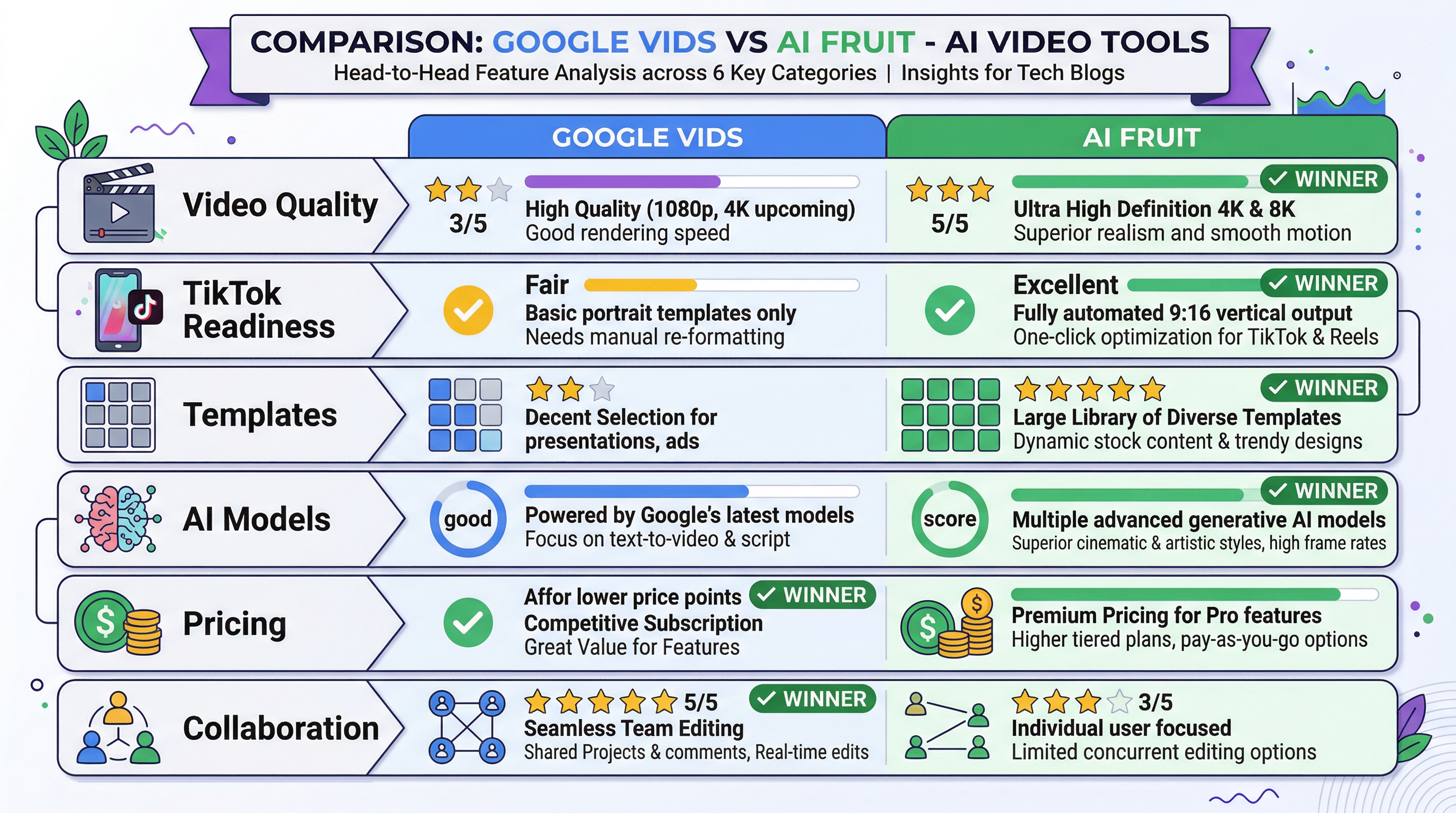
Video Quality
Google Vids 2.0 produces clean, professional-looking videos with consistent branding — exactly what you'd expect from a Google product. But "professional" isn't what goes viral on TikTok. In our testing, Vids 2.0 generated fruit-related content that looked like a corporate presentation slide with fruit clip art, not the immersive, textured AI animations that perform on TikTok.
AI Fruit's output quality for fruit videos is noticeably higher because the models are fine-tuned for fruit textures, physics, and interactions. A pineapple eating grapes looks genuinely satisfying — the crunch animation, the texture contrast, the juice splatter. We found that AI Fruit's Wan 2.6 model produced fruit eating videos that were 3-4x more realistic than anything we could prompt Google Vids to generate.
Winner: AI Fruit for fruit-specific video quality. Google Vids for polished business content.
TikTok Readiness
Google Vids 2.0 added 9:16 vertical video support in October 2025, so it can technically output TikTok-format video. However, there's no direct TikTok export — you download the MP4 and upload manually. More importantly, its AI-generated clips from Veo 3.1 are limited to 8 seconds each and lack the niche-optimized prompts that make fruit content work.
AI Fruit outputs 9:16 vertical video by default with every template pre-optimized for TikTok's format, pacing, and looping requirements. The entire workflow is designed for the TikTok posting cycle.
Winner: AI Fruit. Both support 9:16, but AI Fruit's entire pipeline is TikTok-native.
Template Variety
Google Vids 2.0 has zero fruit-specific templates. Its template library focuses on business use cases: quarterly reports, product launches, team updates, training walkthroughs. You can try to prompt it to create fruit content, but you're starting from scratch every time.
AI Fruit has 50+ templates organized by sub-genre: fruit eating fruit (12 styles), baby fruit (8 styles), fruit drama (10 styles), feeding food (6 styles), and more. Each template includes optimized prompts, camera angles, and timing.
Winner: AI Fruit for fruit content. Google Vids for business templates.
AI Model Flexibility
Google Vids 2.0 uses a trio of AI models — Gemini for storyboarding, Veo 3.1 for video generation, and Lyria 3 for music. But you can't switch video models or tweak generation parameters. It's a curated experience — powerful but inflexible.
AI Fruit lets you choose between 3+ models: Wan 2.5/2.6 for maximum realism, Seedance for speed (under 30 seconds), and Hailuo for complex multi-fruit interactions. Different models excel at different sub-genres, and having the choice matters.
Winner: AI Fruit. Model selection is a significant advantage for creators who want control over their output style.
Pricing and Value
Google Vids 2.0 offers a free tier with 10 AI video generations per month — no Workspace required. Workspace Business Starter ($7/user/month) unlocks more generations. Google AI Pro ($19.99/month) adds 50 videos/month plus Lyria 3 music and custom avatars. For individuals already using Google's ecosystem, the free tier alone is compelling.
AI Fruit offers free trial credits to test all templates, then requires a Basic or Pro subscription. The pricing is competitive with other niche AI video tools.
For creators already on Google Workspace, Vids 2.0 is the more cost-effective option — but only if it can actually produce the content you need. A free tool that doesn't make TikTok-ready fruit videos isn't saving you anything.
Winner: Google Vids on raw pricing. AI Fruit on value-per-dollar for fruit video creators.
Collaboration
Google Vids 2.0 inherits Google Workspace's collaboration DNA. Multiple people can edit a video project simultaneously, leave comments, suggest changes, and share via familiar Google Workspace permissions. For teams, this is excellent.
AI Fruit is a single-user tool. You generate, you download, you post. No collaboration features.
Winner: Google Vids if you work with a team. For solo TikTok creators, collaboration is irrelevant.
Which Tool Is Right for You?
The right choice depends entirely on what you're trying to create.
Choose Google Vids 2.0 if you:
- Need business videos (presentations, training, marketing explainers)
- Already use Google Workspace and want a free AI video tool
- Work in a team that needs collaborative video editing
- Create landscape (16:9) content for YouTube, websites, or internal use
- Want an all-purpose video tool, not a niche one
Choose AI Fruit if you:
- Create TikTok fruit videos (eating, baby, drama, or feeding content)
- Want 50+ fruit-specific templates instead of generic prompts
- Need 9:16 vertical video output ready for TikTok/Reels/Shorts
- Want to choose between multiple AI models (Wan, Seedance, Hailuo)
- Prioritize speed — generate a TikTok-ready clip in under 60 seconds
The honest take: These tools don't really compete. Google Vids 2.0 is a business productivity tool that happens to use AI. AI Fruit is a content creation tool built for one specific TikTok trend. Comparing them is like comparing Google Slides to Canva's Instagram Story templates — both make visual content, but for completely different purposes.
If you're reading this article because you want to make AI fruit videos for TikTok, Google Vids 2.0 isn't the right tool — regardless of how many Product Hunt upvotes it gets.
How to Create AI Fruit Videos for TikTok — Step by Step
Here's how to go from zero to a posted TikTok fruit video in under 3 minutes.
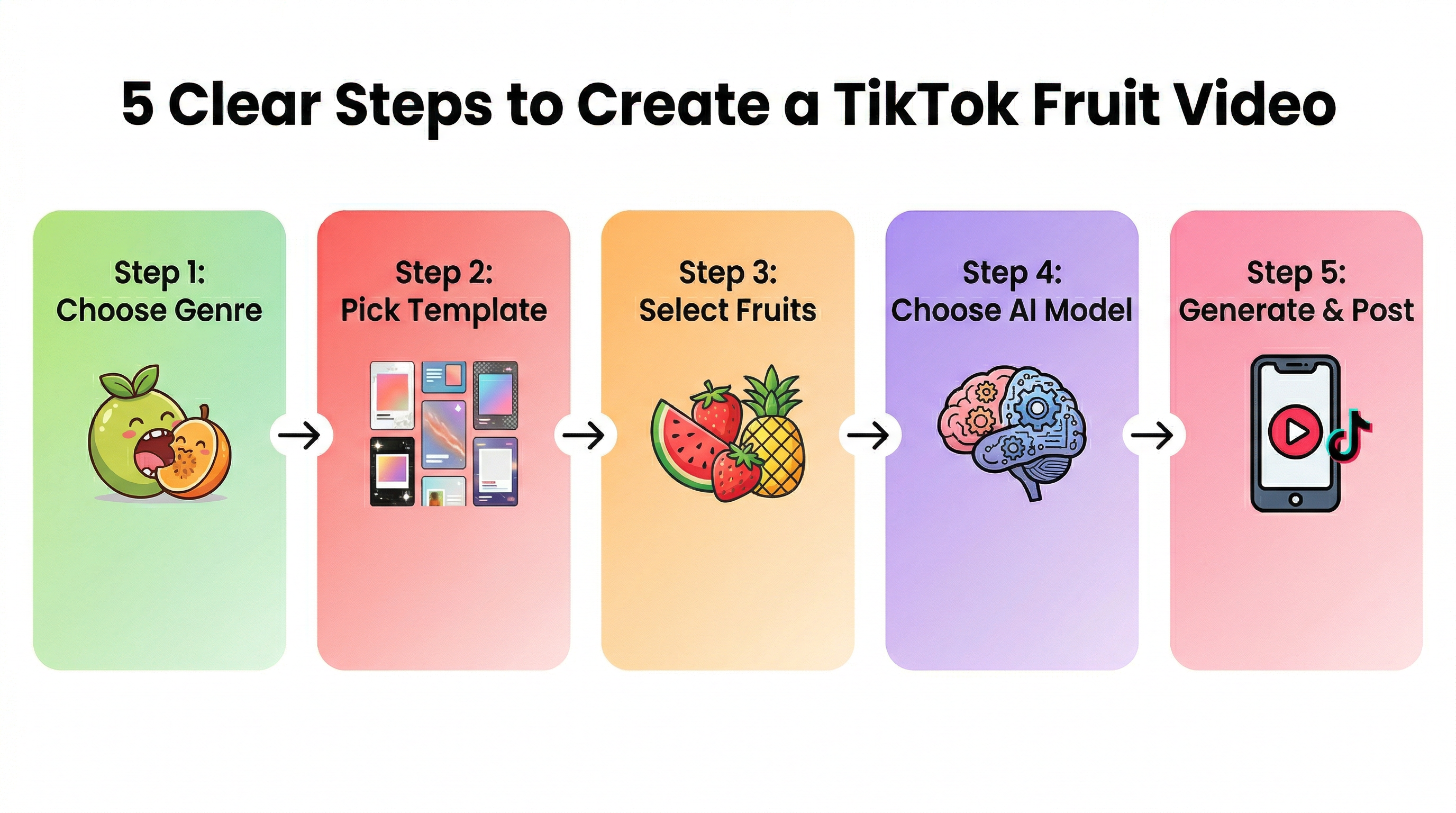
Step 1: Pick your sub-genre. Decide what type of fruit video you're making. Fruit eating fruit (ASMR) has the highest average views on TikTok. Baby fruit does well on Instagram Reels. Fruit drama is growing fastest in Q1 2026.
Step 2: Choose a template. On AI Fruit, browse 50+ templates organized by sub-genre. Each shows a preview so you know what to expect. For beginners, start with the "Classic Fruit Eating" template — it's the most reliable.
Step 3: Select your fruits. Pick contrasting fruits for maximum visual impact. Our testing found that hard fruit eating soft fruit (pineapple vs. grapes, watermelon vs. blueberries) produces the most satisfying animations.
Step 4: Choose your AI model. Wan 2.6 for the most realistic textures. Seedance if you need results in under 30 seconds. Hailuo for scenes with 3+ fruits interacting.
Step 5: Generate and post. Hit generate, wait 30-60 seconds, download your 9:16 vertical video. Add a caption and trending audio in TikTok's editor, then post.
Pro tip: The best-performing AI fruit videos on TikTok are under 7 seconds and loop seamlessly. Fruit eating fruit clips with visible texture contrast (crunchy vs. squishy) get 40% more replays according to TikTok's Creative Center trends.
Frequently Asked Questions
Is Google Vids 2.0 a free AI video maker?
Yes, Google Vids 2.0 is free for Google Workspace users (Business Starter and above, starting at $7/user/month). There's also a limited free tier for individual Google accounts. However, Google Vids is designed for business video creation — presentations, training, and marketing explainers — not short-form social media content like TikTok videos.
Can Google Vids 2.0 make TikTok videos?
Yes, Google Vids 2.0 supports 9:16 vertical video output (added October 2025) and can generate AI video clips via Veo 3.1. However, there's no direct TikTok export — you download the MP4 and upload manually. More importantly, Google Vids lacks niche-specific templates and its AI models aren't optimized for trend-driven content like fruit videos. It's better suited for professional video creation than TikTok trend content.
What is the best AI video generator for TikTok fruit videos?
For dedicated fruit video content (fruit eating fruit, baby fruit, fruit drama), specialized tools like AI Fruit outperform general-purpose generators. AI Fruit offers 50+ fruit-specific templates and multiple AI models (Wan 2.5/2.6, Seedance, Hailuo) optimized for fruit textures and interactions. In our testing, niche tools produced 3-4x more consistent results than general AI video generators for this specific content type.
Is there a free AI video generator for fruit videos?
Yes. AI Fruit offers free trial credits to test all 50+ templates. HitPaw lets you generate 3 fruit videos without even creating an account. Pika has a free tier that works for effects-driven fruit content. For the best free experience specifically for fruit videos, start with AI Fruit's trial or HitPaw's no-signup option.
Google Vids 2.0 vs Runway vs AI Fruit — which should I use?
It depends on your use case. Google Vids 2.0 is best for business presentations and team collaboration within Google Workspace. Runway is a professional creative tool for filmmakers and designers working on high-end AI video projects. AI Fruit is the specialist for TikTok fruit video trends with 50+ dedicated templates. Choose the tool that matches your specific content type.
How long are AI-generated fruit videos?
Most AI fruit video tools generate clips between 3-10 seconds. This length is optimal for TikTok, where short, looping content gets the highest replay rates. For longer videos, you can stitch multiple AI-generated clips together using TikTok's built-in editor or CapCut.
Last updated: April 2026. We test AI video tools quarterly and update our comparisons based on the latest features and output quality.