
Free AI Clipping Tools: What These Plans Actually Give You
OpusClip gives 60 processing minutes a month at 1080p with a watermark; Vizard gives 60 credits (60 minutes) at 720p; 2short.ai meters 30 minutes of analysis. What each free plan caps, and a free-only workflow that ends with one publishable short.

Yes, you can turn a long recording into a publishable vertical short without paying. But "free AI clipping" is not one offer — it is a set of allowances, and every free plan we checked is bounded on the same four levers: how many minutes you can process, what resolution you can export, whether a watermark follows the clip, and how long you have to download it.
Those four bounds matter more than the feature list. A tool that analyzes 60 minutes but watermarks every export is not free in the sense most searchers mean. A tool that gives you 720p but deletes the project after three days is free only if you finish today.
Here is what the current free tiers actually include, and a workflow that gets one publishable short out of them.
What an AI clipper does — and what "free" usually means
An AI clipper reads your long video's transcript, scores candidate moments, cuts them, reframes to vertical with speaker tracking, burns in captions, and hands you clips to review and export. The "AI" is mostly in the selection and reframing; the rest is ordinary editing automation.
That workflow explains the cost model. Vendors meter the expensive part — transcription and analysis of long input — in processing minutes or credits, then make the cheap part (export) either free or gated. So the first question to ask about any free plan is not "how many clips?" but "how many minutes of my source video can it read, and what comes out the other end?"
There is also a terminology trap: a 7-day free trial is not a free tier. Klap's plan grid starts at paid tiers and Submagic sells a subscription with a no-credit-card trial — both are reasonable products, but neither is a free clipping website you can keep using next month. The four plans below are the ones with a standing free tier.
The free tiers, on the same criteria
| OpusClip | Vizard | 2short.ai | Descript | |
|---|---|---|---|---|
| Price | $0 | $0 | $0 (Starter) | $0 |
| Monthly allowance | 60 processing minutes | 60 credits (= 60 minutes) | Pricing card: 30 minutes of AI video analysis. Same page, later: 15 minutes (see below) | 60 media minutes + 100 one-time AI credits |
| Single upload cap | 10 GB local file | 60 minutes, 1 GB | Not stated on pricing page | Free plan media minutes |
| Export resolution | Up to 1080p | 720p | Not stated on pricing page | 720p |
| Watermark | Yes on free | Pricing page: no watermark. Help article: watermark on free (see below) | Not stated on pricing page | Not stated on pricing page (compare table has a watermark-free row) |
| Export / storage window | Clips stop being exportable after 3 days | Storage expires after 3 days | Clips already generated can be exported | Not stated on pricing page |
| Editing on free | No editing | Limited plan features | Full feature access | Text-based editing |
Sources: OpusClip pricing and OpusClip plans help article, Vizard pricing, 2short.ai pricing, Descript pricing. All checked 2026-11-16.
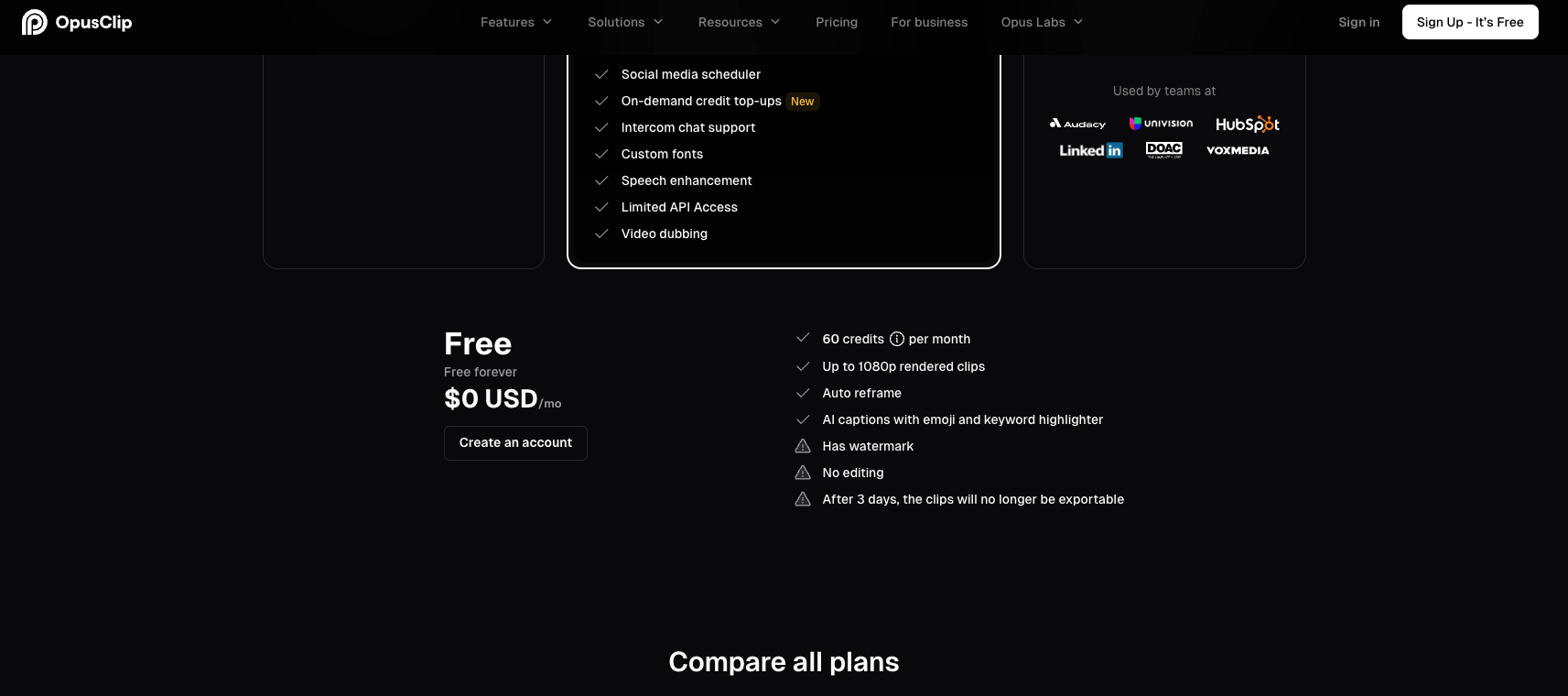
OpusClip's free-plan card and comparison row, captured 2026-11-16 from https://www.opus.pro/pricing.
Blank cells are not a judgment call — they are facts the vendor does not publish on the pricing page. Treat an unpublished limit as a reason to check inside the app before you commit a long recording.
The Vizard watermark contradiction is worth knowing about. Vizard's pricing page currently lists "No watermark" on the free plan. A Vizard help article says the opposite: "if you are on the free plan, your exported videos will have a Vizard.ai watermark and each project will expire after 3 days" (Vizard free-plan help). The pricing page is the newer surface, the help article is the more specific statement. Export one test clip and look at it before you plan a week of publishing around the free plan.
What each free plan is actually good for
OpusClip is the most complete free tier on selection features: transcript-based clipping, auto reframe, emoji and keyword-highlighted captions, 1080p output, and one brand template. The trade is visible in the same table — free exports carry a watermark, editing is off, and clips stop being exportable after three days. If you want to test whether OpusClip's clip selection suits your content, 60 minutes is enough for two half-hour recordings.
Vizard is the free tier most people reach for when the watermark is the dealbreaker, on the strength of that "No watermark" line — read the contradiction above first. What is not in dispute: 60 credits a month, 720p export, a three-day project window, a 60-minute/1 GB upload cap, and a 10-minute cap on a single export. That export cap is the one people miss: a 25-minute interview segment cannot leave the free plan in one piece.
2short.ai meters analysis rather than export, but its pricing page gives two different allowances. The Starter card reads "30 minutes of AI video analyzing per month"; a paragraph further down the same page reads "With our free Starter plan, you get 15 minutes of AI video analysis". Same page, same plan, two numbers — check what the app actually credits before you plan around either. What is not in dispute: the free plan can view and export clips that were already generated, and fast server-side exports are a paid feature (60 minutes a month on the $9.90 Lite plan). It is a sensible free starting point for a channel already built on long YouTube uploads, less so for one-off jobs.
Descript is not a clipper first — it is a text-based editor whose "Create clips, highlights" tool is listed as limited on free. You get 60 media minutes a month, 100 one-time AI credits, 720p export, and ordinary editing that most free clippers lock away. Whether the free export carries a watermark is not stated in the plan cards; the comparison table has a "Watermark-free video export" row, so check one export before publishing. If your real problem is "this long video needs cutting and I want to fix the cut myself", Descript's free tier does more work than a pure clipper's.

The four levers every free clipping plan is bounded by.
The credit math that decides your workflow
Both major clippers document the same conversion. OpusClip: processing costs 1 credit per minute of the original video imported, sub-minute videos round up to one credit, and partial minutes round down — a 4.5-minute video costs 4 credits (OpusClip credits help). Vizard: "1 credit = 1 minute of video processed (for either AI clipping or transcription)", charged once per project even if you run clipping and transcription on the same file (Vizard credits help).
So the free 60 credits on either tool are 60 minutes of source video per month, not 60 clips. That single conversion changes how you should use any free tier:
- Process the segment, not the file. OpusClip lets you narrow the processing timeframe before submitting. Feeding it 20 minutes of a two-hour stream costs 20 credits; feeding it the whole thing costs more than the free plan has.
- Count your exports, not your ideas. Three 20-minute recordings fit in a month. Six 20-minute recordings do not, and the second half of the month is where free plans get abandoned.
- Do the coarse cut in a free editor first. Trimming dead air and setup out of a recording before analysis is free everywhere and directly buys you analysis minutes.
A free workflow that ends with one publishable short
- Pick one target moment before you upload. Write down the single claim, joke, or demo the short should carry. AI clipping selects candidates from what is in the transcript; a rambling preamble gives it rambling candidates.
- Pre-trim the source in any free editor to the 10–20 minute window that contains your moment. This is the highest-leverage step and costs nothing.
- Run the analysis once. Do not re-run the same file to "see if it finds something better" — every run spends the same minutes again.
- Review candidates against the hook, not the virality score. A score ranks predicted watchability; it cannot know that your clip ends mid-sentence.
- Fix captions before export. Captions are generated, not proofread. Names, product terms, and numbers are where they fail.
- Export inside the window. OpusClip clips stop being exportable after three days; Vizard projects expire after three days. If a watermark is unacceptable, confirm it on a test export first, then either accept it or move the captioned clip into an editor you already own.
- Publish vertical and check the first frame. Reframing is automatic; the first frame of an auto-reframed clip is frequently the worst frame. Replace the thumbnail frame before posting.
Scope note
AI Fruit is a generator, not a clipper: it creates new fruit-themed videos from prompts, images, templates, and selectable models. It does not cut up long footage you already have. If your source is a two-hour recording, the tools above are the right class of product; if your source is an idea, generation is a different job.
When free stops being enough
Free tiers stop working at a predictable point, and it is usually one of these, in this order:
- The watermark reaches the audience. For a test clip, fine. For a channel, no.
- Resolution is below what the platform rewards. 720p survives a phone screen but not a large-screen feed; 1080p free (OpusClip) versus 720p free (Vizard, Descript) is a real difference.
- The export window runs out. A three-day window means free clipping is a same-week task, not a backlog you return to.
- Volume passes the allowance. 60 minutes a month is roughly two half-hour episodes, or one long stream if you pre-trim aggressively.
- You need editing. Only Descript's free tier lets you fix the cut; the clippers push editing to paid plans.
If none of those bind yet, a paid plan buys convenience, not a new capability. Pay when a specific bound starts costing you published shorts.
Bottom line
Free AI clipping is a real option in 2026, but the free tier is a bounded allowance, not a free product. Check three numbers before you upload — processing minutes, export resolution and watermark state, and the export window — then pre-trim your source so the allowance goes to analysis instead of preamble. Pick OpusClip for selection features at 1080p with a watermark, Vizard for 720p if you have confirmed its free export comes out clean, 2short.ai if your channel already lives on long YouTube uploads, and Descript if you want to edit the cut yourself. Expect to finish the short in the same week you started it.
Free-tier allowances, resolutions, watermarks, and expiry windows change without notice; the pricing pages and help articles linked above are the current source of truth. No hands-on benchmark was run for this article — every limit stated here is published by the vendor.